Network
The Network widget allows you to test how your application reacts with different network quality and performance types.
Wifi


The Network widget allows you to test your application with different network interfaces, network types and signal strength.
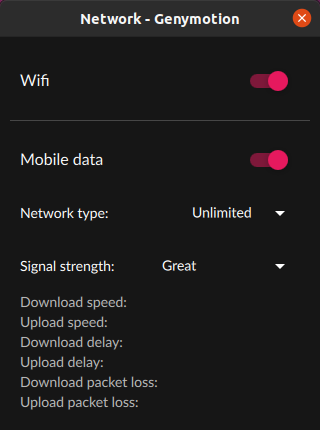
Click to open the network widget:
Wifi
When Wifi is enabled, your applications will behave as if you're connected on a Wifi network. Wifi is enabled by default.
Mobile data
Mobile data is only simulated: Baseband (SIM data connection) is not emulated and it is not possible to send nor receive calls and text messages to other mobile devices from Genymotion.
To use this feature:
- Disable Wifi
- Enable Mobile data
-
Select a Network type from drop-down list:
Download speed Upload speed Upload/Download delay (in ms) Upload/Download packet loss Unlimited N/A N/A N/A N/A 2G GSM 14Kb/s 14 Kb/s 500 0 2G GPRS 57Kb/s 28Kb/s 300 0 2G Edge 236Kb/s 236Kb/s 75 0 3G UMTS 384Kb/s 384Kb/s 75 0 3G HSDPA 13.98Mb/s 5.76Mb/s 10% 0 4G LTE 173Mb/s 58Mb/s 5 0 5G 1174Mb/s 211Mb/s 5 0 -
Select a Signal strength from the drop-down list. Available values are:
Great,Good,Moderate,PoorandNone.
Disable all network
Simply disable Wifi and Mobile data to disable network altogether on the device.
Mobile data is only simulated: Baseband (SIM data connection) is not emulated and it is not possible to send nor receive calls and text messages to other mobile devices from Genymotion.
The Network widget allows you to test how your application reacts with different network quality and performance types:
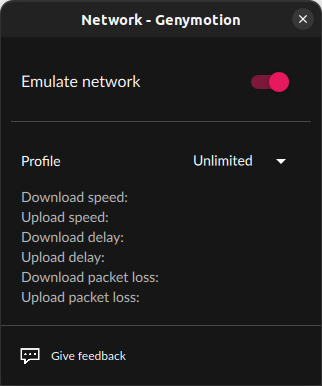
- Click
- Activate the network simulation with the switch
- Select a network profile from the drop-down list:
| Download speed | Upload speed | Upload/Download delay (in ms) | Upload/Download packet loss | DNS delay (in ms) | |
|---|---|---|---|---|---|
| Unlimited | N/A | N/A | N/A | N/A | N/A |
| No data | 0 | 0 | 100% | ||
| 2G GPRS | 57Kb/s | 28Kb/s | 300 | 0 | 1000 |
| 2G Edge | 236Kb/s | 236Kb/s | 75 | 0 | 800 |
| 3G UMTS | 384Kb/s | 384Kb/s | 75 | 0 | 200 |
| 4G LTE | 173Mb/s | 58Mb/s | 5 | 0 | 100 |
| 4G (High DNS delay) | 5.5Mb/s | 17.9Mb/s | 50 | 0.01% | 3000 |
| 4G (High packet losses) | 5.5Mb/s | 17.9Mb/s | 50 | 10% | 100 |
This feature is no longer available for Android 8.1 and below
Click to open the widget:
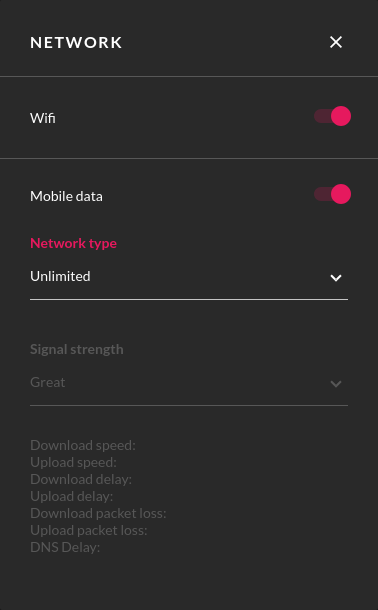
By default, Wifi is enabled. To simulate Mobile Data transfer speed, toggle Wifi off, select a Network Type and a Signal Strength from the drop-down lists.
Network profiles and their corresponding values with max Signal strength (Great) are listed in the table below:
| Download speed | Upload speed | Upload/Download delay (in ms) | Upload/Download packet loss | |
|---|---|---|---|---|
| Unlimited | No Limit | No Limit | No Limit | 0 |
| 2G GSM | 14Kb/s | 14 Kb/s | 500 | 0 |
| 2G GPRS | 57Kb/s | 28Kb/s | 300 | 0 |
| 2G EDGE | 236Kb/s | 236Kb/s | 75 | 0 |
| 3G UMTS | 384Kb/s | 384Kb/s | 75 | 0 |
| 3G HSDPA | 13.98Mb/s | 5.76Mb/s | 10 | 0 |
| 4G LTE | 173Mb/s | 58Mb/s | 5 | 0 |
| 5G | 1174Mb/s | 211Mb/s | 5 | 0 |
Click to open the widget:
By default, Wifi is enabled. To disable Wifi and simulate Mobile Data transfer speed, uncheck Wifi, select a Network Type and a Signal Strength from the drop-down lists.
Network profiles and their corresponding values with max Signal strength (Great) are listed in the table below:
| Download speed | Upload speed | Upload/Download delay (in ms) | Upload/Download packet loss | |
|---|---|---|---|---|
| Unlimited | No Limit | No Limit | No Limit | No Limit |
| 2G GSM | 14Kb/s | 14 Kb/s | 500 | 0 |
| 2G GPRS | 57Kb/s | 28Kb/s | 300 | 0 |
| 2G EDGE | 236Kb/s | 236Kb/s | 75 | 0 |
| 3G UMTS | 384Kb/s | 384Kb/s | 75 | 0 |
| 3G HSDPA | 13.98Mb/s | 5.76Mb/s | 10 | 0 |
| 4G LTE | 173Mb/s | 58Mb/s | 5 | 0 |
| 5G | 1174Mb/s | 211Mb/s | 5 | 0 |