Disk I/O
The Disk I/O widget allows you to emulate devices with slow internal storage. It can be very handy if your app requires reading large amount of data from the disk such as gallery apps that load locally stored images or game apps that load large files.
Click to open the Disk I/O widget:
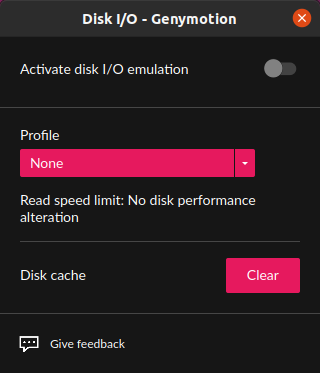
To simulate high or low disk performance:
- Toggle disk I/O emulation.
- From the Profile drop-down box, select a type of device:
| Read speed limit | |
|---|---|
| High-end device | 200 MiB per second. |
| Mid-range device | 100 MiB per second. |
| Low-end device | 50 MiB per second. |
| Custom device | Enter the read speed limit you wish to emulate in MiB. |
When switching from a device profile to another, the disk cache is automatically cleared. You can force clearing the cache by clicking Clear.
Click to open the widget:
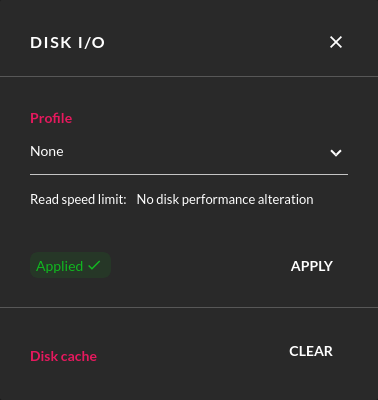
From the Profile drop-down list, select a type of device:
| Read speed limit | |
|---|---|
| High-end device | 200 MiB per second. |
| Mid-range device | 100 MiB per second. |
| Low-end device | 50 MiB per second. |
| Custom device | Enter the read speed limit you wish to emulate in MiB. |
Click APPLY to apply the change.
When switching from a device profile to another, the disk cache is automatically cleared. However, you can force clearing the cache by clicking CLEAR.
As the speed limit provided by this feature comes on top of the one already defined in your Cloud platform instance, make sure the profile you wish to apply does not exceed the disk performance already provided in the instance. If so, the widget will not be able to emulate the expected disk performance. For more information, refer to your Cloud platform documentation.
Click to open the widget:
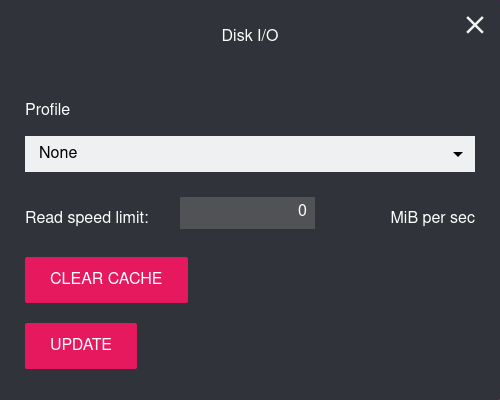
In Profile, select a type of device:
| Read speed limit | |
|---|---|
| High-end device | 200 MiB per second. |
| Mid-range device | 100 MiB per second. |
| Low-end device | 50 MiB per second. |
| Custom device | Enter the read speed limit you wish to emulate in MiB. |
Click UPDATE to apply the change.
When switching from a device profile to another, the disk cache is automatically cleared. You can force clearing the cache by clicking CLEAR CACHE.